Diagnostic Error Codes
The fish-lsp provides numerous diagnostics which are displayed in your editor with a specific error code, and a description of the error.
The error codes are used to identify specific diagnostics and can be used to disable/enable specific diagnostics in your fish scripts.
Important
This page provides a reference table for all the diagnostic error codes that fish-lsp can produce.
Error Code Table
| Severity | Code | Description | Example | Fix |
|---|---|---|---|---|
| ERROR | 1001 | Missing closing token | echo " echo ' begin function foo echo ( | echo ""; echo ''; begin; end function foo; end echo () |
| ERROR | 1002 | Extra closing token | function; end; end; if; end; end; | function; end; if; end; |
| ERROR | 1003 | Invalid array index | $PATH[0] | $PATH[1] |
| ERROR | 1004 | Source filename does not exist | source ./non-existent-file.fish | source ./existing-file.fish |
| ERROR | 1005 | Sourcing filename with . syntax | . ./file.fish | source ./file.fish |
| ERROR | 1006 | Incorrect leading conditional operator | true && true | true and true |
| ERROR | 1007 | Missing or Incorrect option value | function foo -d complete -c foo --description | function foo -d "..." complete -c foo --description "..." |
| WARNING | 2001 | Non-escaped expansion variable in single quote string | echo '$HOME' | echo "$HOME" |
| WARNING | 2002 | alias used, prefer using functions instead | alias ls='ls -G' | |
| WARNING | 2003 | Universal scope set in non-interactive session | set -Ux persistent_var | set -gx persistent_var |
| WARNING | 2004 | External shell command used when equivalent fish builtin exists | cat file.txt | command cat file.txt or use the fish builtin equivalent |
| WARNING | 3001 | test command string check, should be wrapped as a string | test $str1 = $str2 | test "$str1" = "$str2" |
| WARNING | 3002 | Conditional command should include a silence option | if set some_var; end; | if set -q some_var; end; |
| WARNING | 3003 | Dereference variable definition could be undefined | set $some_var value | |
| WARNING | 4001 | Autoloaded function missing definition | in a autoloaded function at: fish/functions/file.fish # empty | in a autoloaded function at: fish/functions/file.fish function file; end; |
| ERROR | 4002 | Autoloaded function does not match filename | in a autoloaded function at: fish/functions/file.fish function __file; end; | in a autoloaded function at: fish/functions/file.fish function file; end; |
| ERROR | 4003 | Function name using reserved keyword | | |
| WARNING | 4004 | Unused local function | in a autoloaded function at: fish/functions/foo.fish | in a autoloaded function at: fish/functions/foo.fish |
| ERROR | 4005 | autoloaded completion missing command name | when a file like: fish/completions/foo.fish complete -c nofoo -f | when a file like: fish/completions/foo.fish complete -c foo -f |
| WARNING | 4006 | duplicate function name in same scope | | |
| WARNING | 4007 | Autoloaded event hook function missing usage | | |
| WARNING | 4008 | Autoloaded function requires a description | function foo; end; | function foo -d "description"; end; |
| INFO | 4009 | Autoloaded helper function name collision | | |
| ERROR | 5001 | Argparse missing end of stdin | argparse h/help | argparse h/help -- $argv |
| WARNING | 5555 | Unreachable code | | |
| WARNING | 6001 | fish-lsp deprecated env variable | set -gx fish_lsp_logfile | set -gx fish_lsp_log_file |
| WARNING | 6002 | deprecated status flag usage | status -i | status is-interactive |
| WARNING | 7001 | Unknown command | nonexistent_command | Use a valid command or define the function |
| WARNING | 8001 | fish-lsp invalid diagnostic code | # @fish-lsp-disable 100111 | # @fish-lsp-disable 1001 |
| ERROR | 9999 | use fish --no-execute to check for syntax errors | N/A | N/A |
Using comments to disable diagnostics per file
You can disable/enable diagnostics from the language server by adding comments to line(s)/line-ranges in your scripts.
There are 4 different ways to change the diagnostics behavior's via comments:
# @fish-lsp-disable
# @fish-lsp-disable-next-line
# @fish-lsp-enable
# @fish-lsp-enable-next-line
Without specifying which diagnostics to disable/enable, the comments will by default disable/enable all diagnostics until the end of the file, or next disable/enable directive.
To specify disabling only specific diagnostics, you can add the error codes to the comments:
# @fish-lsp-enable 1001 1002 1003 1004 2001 2002 2003 2004 3001 3002 4001 4002 4003 4004 4008 5001 7001
echo 'enables diagnostics even if they were previously disabled'

# @fish-lsp-disable 1001 1002 1003 1004 2001 2002 2003 2004 3001 3002 4001 4002 4003 4004 4008 5001 7001
echo 'disables diagnostics even if they were previously enabled'
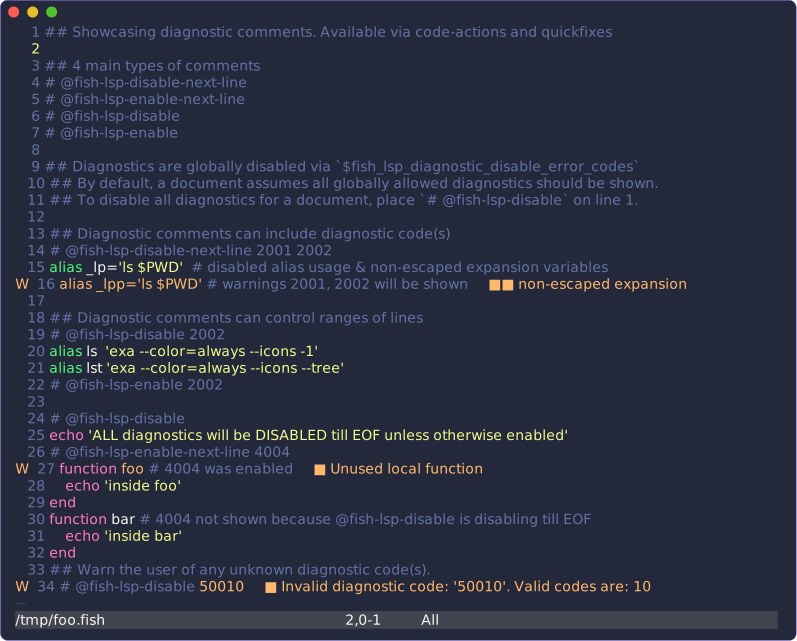
The following example shows how to use these comments in your fish scripts:
# @fish-lsp-enable
echo 'enables all previously disabled diagnostics'

# @fish-lsp-disable-next-line 2001 2002
alias l='ls $PWD' # no warnings for alias usage or non-escaped expansion variables
alias l='ls $PWD' # warnings 2001, 2002 will be shown

## diagnostics can be disabled for a range of lines
# @fish-lsp-disable 2002
alias ls  'exa --color=always --icons -1'
alias lsd 'exa --color=always --icons'
alias lst 'exa --color=always --icons --tree'
# @fish-lsp-enable 2002
### only diagnostic 2002 will be disabled in the range of lines above,
### other diagnostics wont be affected

# @fish-lsp-disable
echo 'all diagnostics will be disabled till EOF unless otherwise enabled'
# @fish-lsp-enable-next-line 2002
alias ls_problem 'exa --color=always --icons -1' # diagnostic 2002 will be enabled

echo 'all diagnostics will be disabled again'
Tip
Try this out directly in the playground!
Note
The fish-lsp will provide code-actions, quickfixes and completions for using these comments in your fish scripts.
Using the env variable for disabling diagnostics
By default all error codes are enabled. Any specific diagnostic can be disabled by appending their number to the fish_lsp_diagnostic_disable_error_codes environment variable.
For example to disable error codes 1001 and 1002 you can set the environment variable as follows:
set -gx fish_lsp_diagnostic_disable_error_codes 1001 1002If you want to ALWAYS disable these diagnostics, you can add them to your config.fish file:
# ~/.config/fish/config.fish

set -gx fish_lsp_diagnostic_disable_error_codes 1001 1002
Temporarily disabling diagnostics
You could also disable diagnostics temporarily by setting the environment variable in your current shell session:
# run this in your interactive shell prompt
begin
    set -lx fish_lsp_diagnostic_disable_error_codes 2001 2002 2003
    $EDITOR ~/.config/fish/config.fish
end
The previous example will open your config.fish file with diagnostics 2001, 2002, and 2003 disabled. Once you close the editor, any previous diagnostic settings will be restored.
Note
See the fish-shell's documentation on variable scopes for more information.
Disabling Diagnostics for edit_command_buffer
The fish function edit_command_buffer is used to edit the current command buffer in the editor. This function is used by the fish shell to edit the current command buffer when you press alt + e in the fish shell.
You can check what key is binded to this function by running the following command in your fish shell interactive session:
bind | string match -e 'edit_command_buffer'
# YOUR OUTPUT SHOULD LOOK SOMETHING LIKE:
#    bind --preset alt-v edit_command_buffer
#    bind --preset alt-e edit_command_buffer
If you wanted to disable diagnostics only while using the fish-lsp is editing a command buffer, you can easily do this by wrapping the edit_command_buffer function with locally exported $fish_lsp_* variables.
The following example shows how to disable ALL diagnostics for the edit_command_buffer function:
function edit_command_buffer_wrapper --description 'edit command buffer with custom server configurations'
  # place any CUSTOM server configurations here
  set -lx fish_lsp_diagnostic_disable_error_codes 1001 1002 1003 1004 2001 2002 2003 3001 3002 3003
  # set -lx fish_lsp_max_background_files 100
  # set -lx fish_lsp_all_indexed_paths ~/.config/fish
  # set -lx fish_lsp_modifiable_paths ~/.config/fish
  # set -lx fish_lsp_logfile /tmp/fish-lsp-cmdline.logs
  # you could see all the available env variables by running:
  # `fish-lsp env --show --no-comments`

  # open the command buffer with the custom server configuration, without
  # overwriting the default server settings
  edit_command_buffer
end
Now you can call the edit_command_buffer_wrapper function instead of the edit_command_buffer function to open the command buffer with the custom server configurations.
bind alt-e edit_command_buffer_wrapperDisabling Alias Warnings
Since fish's alias command is just a wrapper around function and it is recommended to use functions instead of aliases. Users who still prefer using aliases may want to disable diagnostic code 2002.
Warning
Using comment directives is likely a more flexible way to disable diagnostics.
Depending on the situation, my personal preference for using aliases is as follows:
-
Write an aliases file in
~/.config/fish/conf.d/aliases.fish$EDITOR ~/.config/fish/conf.d/aliases.fishNote
the
~/.config/fish/conf.d/directory is auto-loaded before fish reads yourconfig.fishfile during startup, so placing your aliases in here will ensure they are loaded before your interactive shell starts. -
Put all your existing aliases in this file, and add a function to edit the aliases file without alias warnings
# ~/.config/fish/conf.d/aliases.fish # function to edit the aliases file without alias warnings # short for 'alias edit' function aliased --description 'edit conf.d/aliases.fish' # when executing `aliased`, the file will be opened without alias warnings set -lx fish_lsp_diagnostic_disable_error_codes 2001 2002 $EDITOR ~/.config/fish/conf.d/aliases.fish fish --no-execute ~/.config/fish/conf.d/aliases.fish and source ~/.config/fish/conf.d/aliases.fish if test $status -eq 0 set_color blue --bold && echo -n 'SUCCESS: ' && set_color normal echo "~/.config/fish/conf.d/aliases.fish sourced" else set_color red --bold && echo -n 'ERROR: ' && set_color normal echo "~/.config/fish/conf.d/aliases.fish not sourced" end end # enter your aliases here alias sf='source ~/.config/fish/config.fish' alias ls='exa -1 --color=auto --icons' alias lsd='exa --color=always --icons' alias nvimf='$EDITOR ~/.config/fish/config.fish' alias nvimn='$EDITOR ~/.config/nvim/init.lua' alias rdme='$EDITOR README.md' # ... -
Source your fish configuration file and the
conf.d/aliases.fishfilesource ~/.config/fish/conf.d/aliases.fish source ~/.config/fish/config.fish -
Now you can use aliases without warnings when executing
aliased, but prefer using functions elsewhere in your fish workspace# in your interactive shell, execute the aliased function aliased # alias warnings are still shown elsewhere in your config $EDITOR ~/.config/fish/config.fish
Note
I also like to structure my abbreviations in a similar structure, with both:
- a
~/.config/fish/conf.d/abbreviations.fishfile. - an
abbredfunction to edit the abbreviations file.
This way your abbreviations, functions, and aliases are all in separate files and can be managed independently.
Other Notes
Diagnostics errors are planned to be expanded in the future to include more specific errors and warnings.
If you have any suggestions for new error codes, please see this discussion.
Any help contributing to code-actions/quick-fixes that the lsp could provide for these errors would be greatly appreciated.
Relevant Source Code
The relevant source code for the diagnostics can be found here.